Components
Card
Use Semji's card component to create readable, responsive content displays with Tailwind CSS for your web applications.
Basic example
Default
A fundamental card includes a title, content, and an additional action content.Cards initially have no predefined width, thus they inherit a 100% width by default unless specified otherwise.
Welcome to Our Service
Discover the features and benefits that our service offers. Enhance your experience with our user-friendly platform designed to meet all your needs.
Size
Card Sizes
Card sizes with `card-{xs|sm|md|lg|xl}` utility classes.
Innovative Solutions
Explore our cutting-edge features designed to elevate your experience. Learn how our solutions can help you achieve your goals.
Innovative Solutions
Explore our cutting-edge features designed to elevate your experience. Learn how our solutions can help you achieve your goals.
Innovative Solutions
Explore our cutting-edge features designed to elevate your experience. Learn how our solutions can help you achieve your goals.
Innovative Solutions
Explore our cutting-edge features designed to elevate your experience. Learn how our solutions can help you achieve your goals.
Innovative Solutions
Explore our cutting-edge features designed to elevate your experience. Learn how our solutions can help you achieve your goals.
Content types
Body
Simple body example with text.
Welcome to our card Indulge in a delightful journey through our offerings. Jelly lemon drops, tiramisu, chocolate cake, cotton candy, soufflé, and oat cake sweet roll are just a taste of what's in store.
Image
Example showcasing an image card with content.

Apple Smart Watch
Stay connected, motivated, and healthy with the latest Apple Watch.
Titles, text, and links
Buttons and links placed within `card-actions` can be referred to as actions.
Welcome to Our Platform
Explore a range of features and services designed to enhance your experience. Join us and make the most out of what we have to offer.
Card header
With component class `card-header` you can specify the styling and content for the header sections of a card element in your web application.
Exclusive Feature Highlight
Discover the unique benefits and features we offer. Dive deeper to learn how our solutions can enhance your experience and meet your needs effectively.
Card footer
With component class `card-footer`, you can specify the styling and content for the footer sections of a card element in your web application.
Featured Update
Explore the latest enhancements and updates. Stay informed with our new features designed to improve your experience and deliver greater value.
List group
Create a simple list displayed within a card-like interface. Utilize the <a href="https://tailwindcss.com/docs/border-width#between-children" target="_blank" class="link link-primary">Divide</a> utility class to add borders between the list items.
- Product Overview
- Key Features
- Customer Reviews
Images caps & overlay
Image placeholders
The image's positioning in the card is determined by the placement of the figure element. When the figure element is the first child, the image will be positioned at the top; conversely, if it is the last child, the image will be positioned at the bottom.

Airpods Max
A perfect balance of exhilarating high-fidelity audio and the effortless magic of Airpods.
Airpods Max
A perfect balance of exhilarating high-fidelity audio and the effortless magic of Airpods.
Image overlays
By utilizing the `image-full` modifier class, the image expands to occupy the entire width and is employed as an overlay.

Marketing
Boost your brand's visibility and engagement through targeted marketing strategies.
Card glass
Apply the `glass` modifier class to the `card` component class to impart a glass effect onto the card.
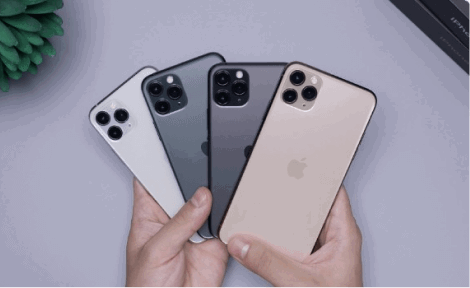
Smartphone
A high-quality smartphone with the latest features for a premium user experience.
Horizontal
The `card-side` class positions images responsively, with options for left or right placement based on breakpoints like `sm`, `md`, and `lg`.
Airpods Max
This is a wider card with supporting text below as a natural lead-in to additional content.
Card layout
Card groups
Utilize the `card-group` class to establish a container for organizing cards into a cohesive group.

Travel to Paris
Discover iconic landmarks, world-class museums, and exquisite cuisine. Explore the Eiffel Tower, Louvre Museum, and charming neighborhoods.

Travel to Rome
Visit ancient ruins, stunning basilicas, and enjoy delicious Italian cuisine. Explore the Colosseum, Vatican City, and more.

Travel to Sydney
Explore the vibrant city of Sydney, where every corner tells a story. Visit iconic landmarks, laze on beautiful beaches, and immerse yourself in a lively arts scene.
Animations
Image scaling animation on hover
Implement a hover effect on the card image that animates a zoom-out transition.

Card title
Nike Air Max is a popular line of athletic shoes that feature Nike's signature Air cushioning technology in the sole.
Translate animation on hover
Apply a hover animation to the card image that translates it upwards.
Discover a range of delightful treats including lemon drops, tiramisu, chocolate cake, and cotton candy. Our collection offers a variety of flavors to satisfy every craving.
Enjoy a selection of sweet indulgences such as soufflé, oat cake, and sweet rolls. Each item is crafted to bring a touch of sweetness to your day.
Navigation
Tabs in card
Basic tabs in card example.
Welcome to the Home tab! Here, you can explore the latest updates, news, and highlights. Stay informed about what's happening and never miss out on important announcements.
This is your Profile tab. Manage your personal information, update your account details, and customize your settings to make your experience unique.
Messages: Check your recent messages, start new conversations, and stay connected with your friends and contacts. Manage your chat history and keep the communication flowing.
Illustrations
Style variation
Feel free to apply this variation to all our semantic color utility classes or Tailwind colors.
Customer Support
Enhance customer satisfaction by providing timely and effective support solutions.
Customer Support
Enhance customer satisfaction by providing timely and effective support solutions.
Customer Support
Enhance customer satisfaction by providing timely and effective support solutions.
Text alignments
By default, text is aligned left. You can modify the alignment using utility classes such as `text-center` or `text-right`.
Customer Support
Enhance customer satisfaction by providing timely and effective support solutions.
Customer Support
Enhance customer satisfaction by providing timely and effective support solutions.
Customer Support
Enhance customer satisfaction by providing timely and effective support solutions.
Card with border
You can use `card-border` for bordered card.
Welcome to Our Service
Discover the features and benefits that our service offers. Enhance your experience with our user-friendly platform designed to meet all your needs.
Card with alert
You can use the `card-alert` class to style alert messages inside a card.
Security Alert
We have detected a potential security vulnerability. Please update your settings to ensure your data remains safe. Click the link below for detailed instructions.
Update NowEmpty card
Show an empty state placeholder when no data is available, providing friendly tips for users.
Card actions
Utilize the `data-remove-element` attribute to specify the connected ID for card removal. Customize the removal animation by incorporating the `removing:` modifier, as illustrated below.
Important Update
Stay informed with the latest updates and features that enhance your experience. Click on the icons above to refresh, maximize, or close this card.
Learn moreClass referenceThe component, style, color, state, size and modifier classes available for this component.
| Class | Type | Description |
|---|---|---|
card | component | Container element. |
card-group | component | Container for card groups. |
card-header | part | Header part (content) |
card-title | part | Title of card. |
card-body | part | Body part (content) |
card-actions | part | Actions part (buttons, etc.) |
card-footer | part | Container for footer. |
card-border | style | Adds border to `card` component. |
card-alert | style | Styles alert messages inside a card with rounded corners. |
card-xs | size | The card will be extra small in size. |
card-sm | size | The card will be small in size. |
card-md | size | The card will be medium(default) in size. |
card-lg | size | The card will be large in size. |
card-xl | size | The card will be extra large in size. |
card-side | modifier | The image in 'figure' will be on to the side. |
image-full | modifier | The image in 'figure' element will be the background. |